Showing posts with label interactive website. Show all posts

February 21, 2013

Image Quiz


ImageQuiz is a new site in beta which allows users to create quizzes using images .  In order to answer each question you must click on the correct spot in the image.  Images can be uploaded or linked by URL.  If you have access to image editing software the possibilities are endless.

Some ideas for using this site:

  • identify objects in a pictures (foreign language)
  • places on a map (geography)
  • parts of the body (health)

To see it in action try this quiz about New York.

Now What?

I really like that this site is fast and easy to use.  The interface leaves a little to be desired as it doesn't have much in the way of aesthetics but it gets the job done.  Have your students record their scores and times and see who can answer the most questions in the smallest amount of time.

November 15, 2012

Story Math


Story Math is a cool website that I recently read about on iLearn Technology.  Story Math is a collection of three math-based activities that use storytelling as a means of presenting a problem.  The stories are interactive and put math concepts into authentic situations.  The three stories that are currently available are "Mystery on the Block", "The Perfect Arrangement", and "A Suitable Partner".   Each story focuses on a different math skill including geometry, permutations, and puzzles.  In addition to the interactive story, each activity also includes extension games and interesting information.  I went through the "Mystery on the Block" activity and found it to be very engaging and the interactivity was well placed.  I could definitely see this being used as a whole class activity.  To see what an activity looks like check out the image below...


Now What?

Story Math is a really cool site for introducing a new concept or reviewing what has already been taught.  At my school, we have a block called content literacy where math teachers focus on breaking down math problems and pulling out the important information.  These stories would be excellent to use for deciphering important information.  After completing one of these activities you could also have the students discuss the math connections that were made and how they can they be applied.  You could also discuss new vocabulary that was introduced.  Students could even create their own math story based on a concept learned in class!

June 12, 2012

Flash Files in Smart Notebook

If you have been using Smart Notebook's toolkit you may have noticed that it is lacking in the area of science simulations.  What's nice about Notebook is that you can import your own animated .swf files but then you would need to know how to use Macromedia Flash to create your own animations...or do you?  Freeze Ray is a website that has a ton of science simulations that are all flash based and with a little bit of finagling (sp?) you can use those .swf files right in your Notebook lessons.  To see how easy this can be done, check out the tutorial below:


May 11, 2012

Weekly Technology Assignment 8 - Prezi


This week's technology assignment uses a website called Prezi which many of you are probably familiar with at this point.  Prezi is a presentation tool (hence the name Prezi prounounced pre zee) which has taken the world by storm in the past year.  It is easy to use and much more dynamic than the presentation types of old.

Website: Prezi

Activity:  This site is great for teachers looking for a new way to present information to their students but even better for students looking for a new way to present information to their peers.  PowerPoint is an excellent program but it can be...how should I put it...boring at times.  Prezi allows users to create a much more flashy presentation that is engaging and interactive.  A good introductory assignment for your students would be to create a simple 5 path Prezi describing a topic in class or a vocabulary word or even answering a homework question with some supporting details.  Check out the tutorial below to see how easy it is to use and publish on Prezi.

May 4, 2012

Weekly Technology Assignment 7 - Popplet


This week's technology assignment uses a website called PoppletPopplet allows users to create an interactive bulletin board with text, images and video.  As you add more and more to your Popplet board you can even link those "popples" together to show relationships and tie everything together.

Website: Popplet

Activity:  This site can be used either for a homework assignment or more extensively as a project which can be presented in class.  Teachers can also use this site as a way to present information in class.  If you choose to assign this for students...have them create a concept map for a topic that you are currently studying or in place of a PowerPoint presentation that they are going to create.  Popplet can be a great tool for summarizing a book or science topic like the digestive system.  In a social studies class you can create an interactive timeline of events by creating a horizontal Popplet.  Math students can even use Popplet to show their work and explain the process of solving a quadratic equation.  NOTE: There have been issues reported with using Internet Explorer so it is advised to use something like Firefox or Google Chrome when using Popplet.

Example:  Harry Potter

Tutorial: 

April 24, 2012

Walk Me

Walk me is a great new site which offers website owners (like teachers) to create walk through videos for their sites so that their end users (students) will have an easier time navigating the site or completing a requested action.  Creating an account on Walk me is free and will give you the ability to embed three walk through videos on your site.  If you would like the ability to include more than three videos you can check out their pricing tiers.  In order to create your video you will need to download their software which allows you to create your videos while viewing your website.  Check out the video below to see this application in action...


Now What?

When I was in the classroom, I remember students asking me questions about the class website and where they could find certain items and resources.  Using the three free Walk me videos I bet I could have made things easier for myself and my students.

April 23, 2012

Gooru


Gooru is a fairly new website which is a useful for math and science teachers looking for some great resources for their classes.  Once I created my free account I found that there were lots of different types of resources available including videos, interactive displays, documents, diagrams, and quizzes.  These resources are broken out by topics so you can find what you are looking for quite easily.

Once you create an account on Gooru you can browse and use the free resources saving them to your "resources folder" on the site.  You can even grab the browser extension which will allow you to save content from other sites into your Gooru folder.

Now What?

Gooru is a great resource for finding new content and lesson plan ideas for teachers of math and science.  Students can even use Gooru to find materials for review or to take practice tests on the available subjects.  For those teachers with interactive whiteboards, Gooru makes it very easy to find interactive websites which will work with your boards.

April 5, 2012

ThingLink


ThingLink is a site where you can take an ordinary static image and add some interactivity and multimedia to enhance it.  Using ThingLink is a great way to encourage students to think outside of the box for a presentation or when creating a study guide for an upcoming test or quiz.  Last week I wrote about ThingLink and created an assignment for teachers to use in my Weekly Technology Assignment and it has been very well received by teachers and students.  I recently went into a psychology classroom and helped students to create their  ThingLink image for a study review of different aspects of their unit.  Excellent lesson!  Check out the video tutorial below for an overview of ThingLink and how you can use it to create your very own interactive infographic.


April 3, 2012

Learn Click

Many teachers are looking to find more engaging homework assignments for their students but at times you really just need them to complete a basic comprehension level activity to better understand something you discussed in class.  Learn Click is a site that can help you with that.  In a matter of minutes you can add some text (copy and paste) and then choose the words that you want to remove from the passage.  You can then choose from three methods of filling them in on Learn Click.  You can leave them open ended, select from a drop box or drag and drop the correct choice.  Essentially you are creating an online interactive Cloze activity for your students and when they are finished they can check their answers to see how they did.  Upgrading to a premium membership ($10 for the year) will get you unlimited quiz creation ability and also access to grades for each student who completes the activity online.

NEW!!!  You can now export your cloze assignments to a .pdf file for posting on a webpage or printing.

Now What?

Learn Click is a really simple site to use for cloze type activities.  This could be a good resource for teachers with interactive whiteboards as well who like to use fill in the blank activities in class.  Click here for an example cloze activity about WWII.

March 7, 2012

Zygote Body

I came across a great website today called Zygote Body formerly known as Google Body.  On this interactive site you can view a 3D model human layer by layer.  Using Google Maps like controls you can zoom, rotate, and pan the body and included systems.  This site requires a decent video card to keep up with the transitions.  It also seems to only work with Google Chrome although I haven't tried Safari.

Check out a preview of this site below...


January 26, 2012

Interactive Science Simulations

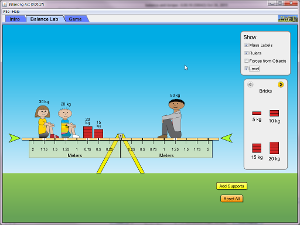
For those teachers with a SmartBoard in their classroom it is always exciting to find new websites and content that will allow students to get up and interact with the lesson.  The University of Colorado has a website that has a tremendous amount of simulations for use in a science or math classroom.  You can run the sims on their site or download them to your computer.  You can even embed them (blog, wiki, website) to allow students to access them more easily.  I tried one of the sims and found it to be very fast and user friendly.  Click the image below to launch the see-saw simulation.


Now What?

These simulations are a great way to engage students in authentic applications of science and mathematics.  You can set this activity up in your classroom as a station or have the entire class make predictions and evaluate the outcomes of the sim.